- All in MYTH
- Product AI
- Tech Pack Reading
Product AI · Tech pack checker New
Tech Pack Reading
Your tech pack, read and checked.
Upload a PDF or a scan. MYTH reads the tech pack, checks measurements and tolerances, and marks each problem row.
PDF or scanExcel export
How it works
Three steps in Tech Pack Reading
- 01
Upload the tech pack
Drop a multi-page PDF or a scanned page as PNG, JPEG or WebP and press Read. Reading takes 20 to 30 seconds; you can leave and come back to it from History.
- 02
Review the checks
The Automatic checks cover size order, grading, tolerance and value count, and problem rows are marked in the table. Add a Reference measurement sheet to compare against an earlier style.
- 03
Fix and pass it on
Edit a cell and press Enter: the checks run again. Export to Excel or Print / Checklist, or press Use in Real to Sketch to carry it into a tech sheet.
See it work
Can you spot the error?
MYTH read this sample tech pack and found 81 fields, 1 error and 6 warnings. The error is named under the chart.
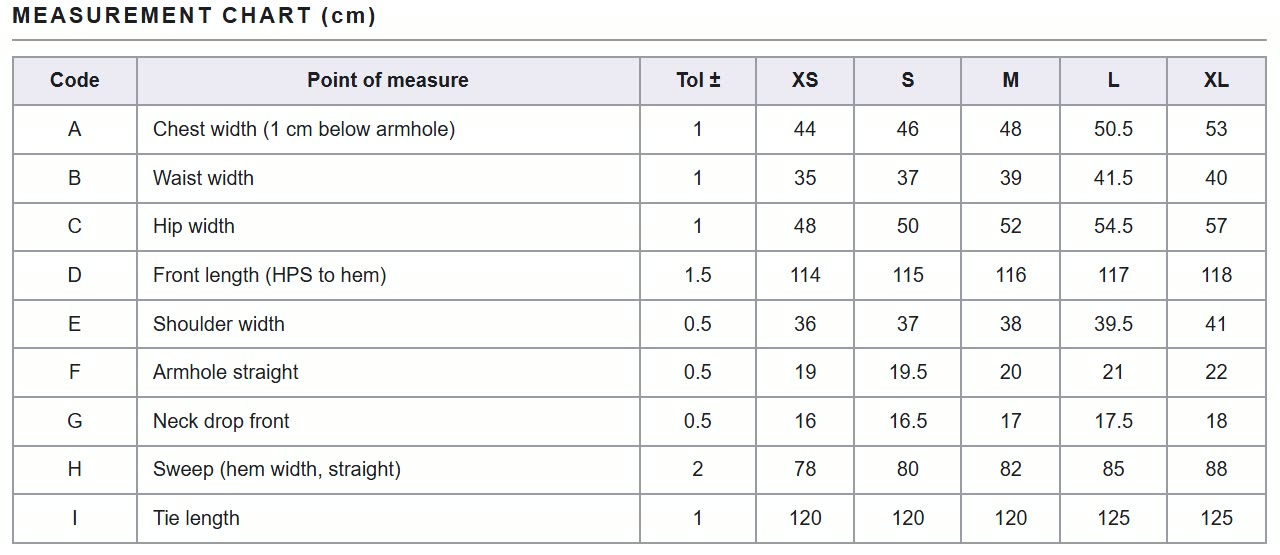
Tech pack review
Measurement charts, checked row by row
A tech pack is the file a brand sends to a factory: technical flats, a measurement chart with points of measure, sizes and tolerances, a bill of materials and construction notes. A grading error or a missing tolerance in that chart is easy to miss until a sample comes back wrong. Tech Pack Reading reads the PDF or scan, puts the header, measurement table, materials and notes into one view, and checks the size run as it reads.
For each point of measure it checks that the number of values matches the sizes, that the values grow with the size, that the grade steps are regular and that a tolerance is set. Add a reference measurement sheet, an earlier reading or an uploaded one, and it compares the grade steps and the sample-size value on the sizes both share, converting between cm and inch. Correct a value in the table and the checks run again.
Export the result to Excel or a printable checklist, or send it to Real to Sketch, where the measurements, materials and notes fill a new A4 tech sheet around the technical flat.
Who uses it, and for what
Quality and technical teams
Check an incoming tech pack for grading errors and missing tolerances before a sample is made, and tick off the printed checklist row by row.
Buyers and merchandisers
Compare a supplier’s sheet with an earlier style or your own base sheet, size by size, in cm or inch.
Factories and suppliers
Read a customer’s tech pack into a clean table, correct values in place and send it back as an Excel file with measurements, materials, notes and checks.
Product developers
Carry a checked reading into Real to Sketch, so the measurements and the bill of materials land on the new tech sheet.
The details
What goes in, what comes out
- Input
- A multi-page PDF or a scanned page: PDF, PNG, JPEG or WebP
- What is read
- Header (style no, style name, season, category, fit, supplier, date, sample size), measurement table and tolerances, bill of materials, construction notes
- Automatic checks
- Value count against the sizes, values that drop as the size goes up, irregular grading, missing tolerances
- Reference
- Compare grade steps and the sample-size value with a previous reading or an uploaded reference sheet; cm and inch are converted
- Reading time
- About 20 to 30 seconds per tech pack
- Exports
- Excel with three sheets (Measurements, Materials, Notes and Checks), Print / Checklist, CSV and JSON
- Next step
- Use in Real to Sketch: the style info fills the sheet header; measurements, materials and notes go into the tech sheet
- Plans
- All paid plans. A reference sheet is read and charged like any other reading
Questions
About Tech Pack Reading
Something else? Ask the team.
What is a tech pack?
A tech pack (technical package, or spec sheet) is the document a brand sends a manufacturer to make a style: technical flats, a measurement chart with points of measure, sizes, grading and tolerances, a bill of materials with fabrics and trims, and construction notes. Tech Pack Reading reads its header, measurement chart, bill of materials and construction notes from a PDF or a scan, and checks the measurement chart for you.
What exactly does it check?
For each point of measure: whether the number of values matches the number of sizes, whether the values grow with the size, whether the grade steps are regular and whether a tolerance is set. Every row with a problem is marked in the table.
Can it compare against an earlier style?
Yes. Pick a previous reading or upload a reference sheet. On the sizes both sheets share, MYTH compares the grade steps and the sample-size value and lists each deviation, converting between cm and inch where needed.
Does it read scanned pages?
Yes. A scan works as PNG, JPEG or WebP, and a PDF can hold the whole multi-page tech pack.
Can I correct a value?
Click the cell, type the right value and press Enter. The checks run again on the new value, and a row you have fixed is marked as resolved.
What do I do with the result?
Export an Excel file with three sheets, print a checklist to tick off row by row, or send the reading to Real to Sketch, where it fills the header, measurement table, bill of materials and notes of a new tech sheet.
Which plans include it?
Tech Pack Reading is part of every paid plan. If a file cannot be read, the credit is refunded.



Product AI · every plan
Try it on your own design.
Every plan includes every tool. Credits are in your account the moment payment is confirmed.