- All in MYTH
- Everywhere
- MYTH Edit
Everywhere · Textile design editor
MYTH Edit
A layered editor, inside MYTH.
Every design sits in its own frame on one shared canvas. Work in layers and blend modes, run the AI tools on any frame and export print-ready files.
16 blend modesTIFF with layers
How it works
Three steps in MYTH Edit
- 01
Bring designs in
Choose an image from your history, collections or computer, open a layered TIFF with its layers, or start with a blank frame in a preset size such as Square, Story or A4.
- 02
Edit in layers
Select with marquee, lasso, magic wand or Object Select, paint and draw vector paths, add text, and stack layers with masks, adjustments and blend modes.
- 03
Run AI, then export
Run Remove Background, Make Seamless, Colorway, Vectorize or Mockup on a frame, or generate from the AI bar under the canvas. Export sets the format, DPI and tile size.
See it work
One canvas, every frame
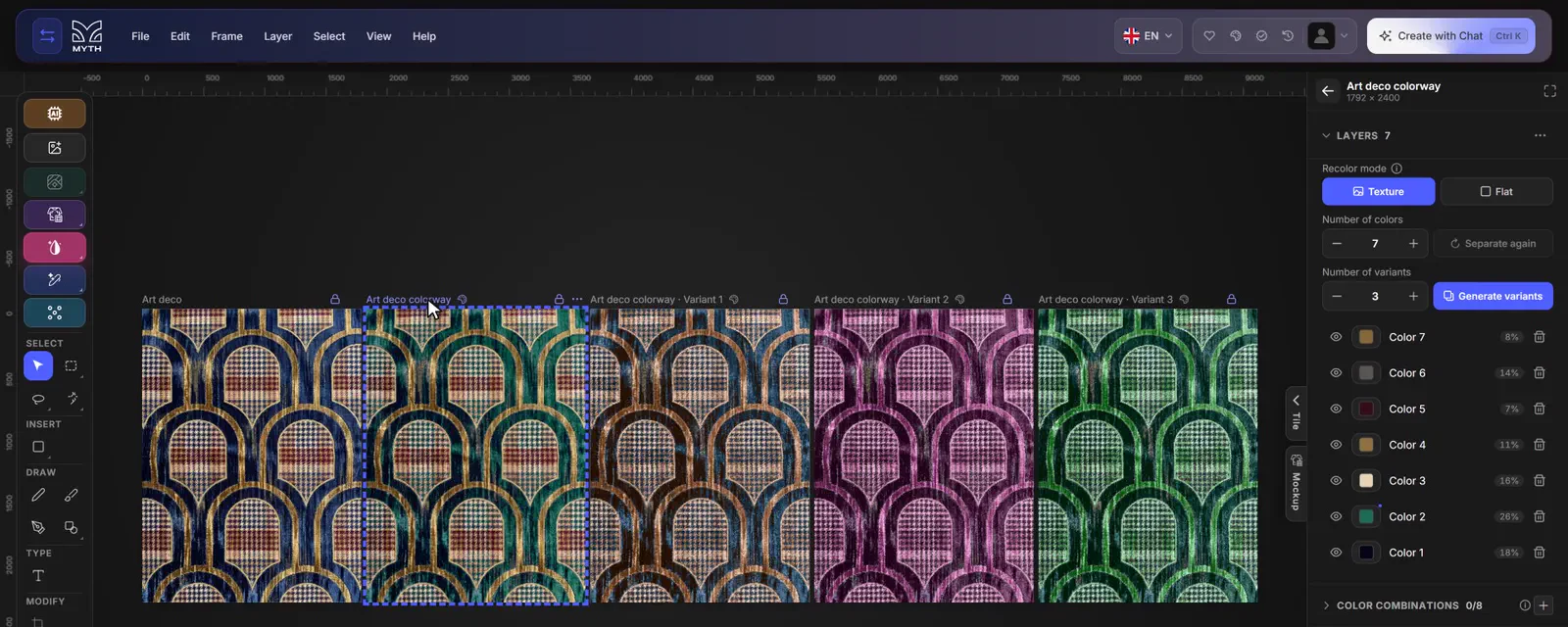
A real MYTH Edit screen: one print separated into seven colours, with three colourway variants as frames beside it.
Print-ready files
A layered editor that knows repeats
MYTH Edit is the online editor where textile designs are finished for print. It works like the layered editors designers already use, with selections, masks, adjustments and blend modes, and it opens a layered TIFF with every layer kept editable, with its name, opacity and blend mode. Each design sits in its own frame on one canvas, so a print, its colourways and its mockups can be compared side by side.
The textile checks are built in. Preview as Tile shows a frame as a block, half drop, brick, horizontal or vertical repeat, with tile size, spacing and tile lines, so a seam or a gap shows before the file goes to print. A3 Print Preview lays the repeat out at real size on an A3 sheet with a centimetre ruler and the colour strip, to print at 100%. Separate into Colors splits a print into its flat colours, one layer each, free and in your browser, ready to recolour with Colorway.
Export sets the repeat mode, the tile size and the DPI, from 72 to 1400, up to 8192 px, as TIFF, PNG, JPEG, PDF and more, or as a TIFF with layers; frames from Vectorizer download as SVG.
Who uses it, and for what
Print and textile designers
Clean up a generated print, check it as a half drop or brick repeat and export it at the DPI production asks for.
Textile mills and print rooms
Separate a design into its colours, merge close shades into fewer layers, and send a tiled export or an A3 sheet at real size.
Home-textile and fashion brands
Put a print, its colourways and its mockups side by side as frames on one canvas for a range review.
Designers coming from Photoshop
Open a layered TIFF with its layers, keep working with masks and blend modes, and run the AI tools on the same canvas.
The details
What goes in, what comes out
- Frames
- Square 1080 × 1080, Portrait, Story, Landscape and A4 presets, or draw your own; Mirror Mode for building from elements
- Layers
- Text, image, vector, shape, drawing, mask and group layers, with opacity, 16 blend modes and hue, saturation, brightness and contrast
- Select and draw
- Marquee, lasso (free, polygon, magnetic), magic wand, quick and object select; pencil, brush, pen and a shape library with textile shapes
- Text
- 22 fonts, with size, letter spacing, line height and alignment
- AI and edit tools
- Remove Background, Make Seamless, Colorway, Vectorize and Mockup, each showing its cost before it runs; Colorway and ready mockups are free
- Repeat checks
- Preview as Tile in five repeat types, and A3 Print Preview at real size with a centimetre ruler
- Export
- TIFF, PNG, JPEG, WEBP, BMP, GIF or PDF at 72 to 1400 DPI, up to 8192 px; TIFF with Layers, and SVG for vector frames
- Snapshots
- Save up to 8 snapshots per frame and go back to any of them
Questions
About MYTH Edit
Something else? Ask the team.
Does the editor cost credits?
Editing is free. Only the AI tools use credits, and each one shows its cost before it runs: Remove Background with the Pro Model, Make Seamless, Vectorize and turning your own photo into a mockup. Colorway, the free background model and the ready mockups cost nothing.
Can I open layered files from Photoshop?
Yes. Open a layered TIFF with its layers and each one stays editable, with its name, position, opacity and blend mode. Masks are baked into their layers and 16-bit files come in at 8 bits per channel.
How do I check a repeat before printing?
Preview as Tile shows the frame as Block, Half Drop, Brick, Horizontal or Vertical, with tile size, spacing and tile lines. A3 Print Preview lays the repeat out at real size on an A3 sheet with a centimetre ruler, to print at 100%.
Can I separate a design into colours?
Yes. Separate into Colors splits a frame into flat colours in a new frame beside it, each colour on its own layer that you can recolour, merge or split. It runs in your browser and uses no credits. Vectorize goes a step further: it traces the frame into an SVG in a new frame, one layer a colour.
Which files can I export?
TIFF, PNG, JPEG, WEBP, BMP, GIF and PDF at 72 to 1400 DPI, in px, cm or inches, up to 8192 px. A frame can also be downloaded as a TIFF with Layers, and vector frames export as SVG.
How do the AI tools fit in?
The AI bar under the canvas generates designs or runs AI tools, and each result lands on the canvas as a new frame. In its Create with Chat mode, you describe what you want and add the results you like.
Everywhere · every plan
Try it on your own design.
Every plan includes every tool. Credits are in your account the moment payment is confirmed.