- All in MYTH
- Pattern AI
- Text Edit
Pattern AI · Edit text in images
Text Edit
New words, same lettering.
Change the words on a design without redrawing it. Tell MYTH the text to replace and what goes in its place; the font, colour and perspective stay as they were.
Keeps the fontPatterns and products
How it works
Three steps in Text Edit
- 01
Add the design
Put the image with the text on the Image tile: a slogan print, a placement design or a product image.
- 02
Type both texts
Enter the words in Target Text exactly as they appear, upper and lower case included, and the new words in Replace Text.
- 03
Edit and check
Press Text Edit. If a letter is off, answer No when MYTH asks Are you satisfied with the result?, then add a note and press Edit Again.
See it work
Same bubble, new words
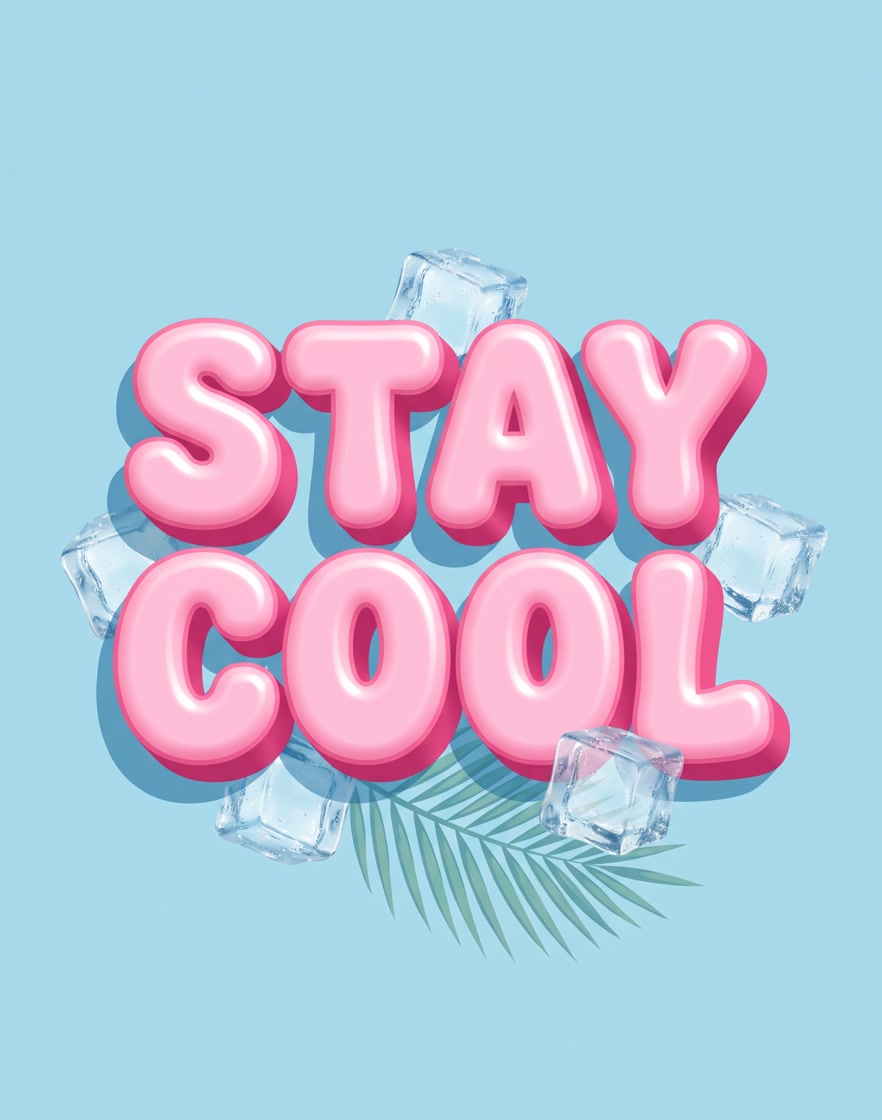
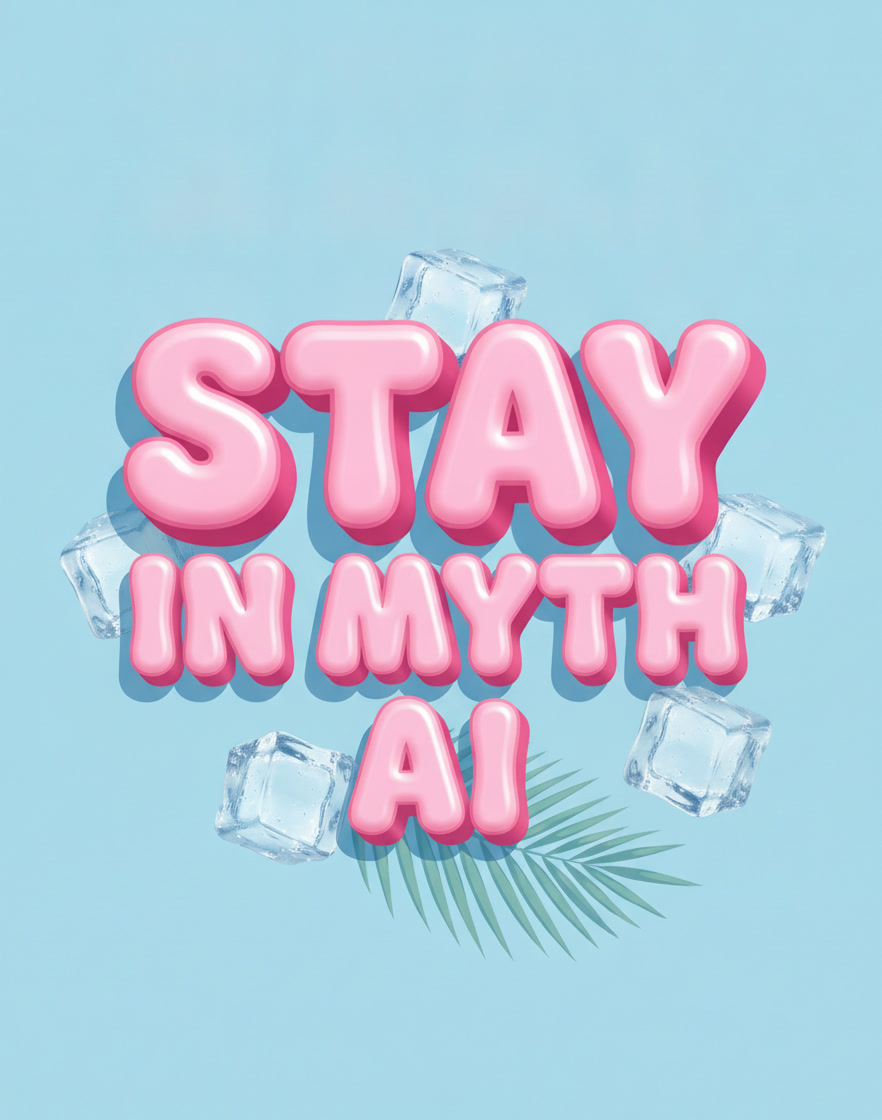
STAY COOL became STAY IN MYTH AI. The 3D bubble lettering, the colours and the setting carried over.
What it is for
Change a slogan without redrawing it
The words are often the part of a design that changes most: a slogan for a new season, a brand or collection name, a date, a spelling to correct. Redrawing the lettering by hand takes longer than the change deserves, and a new font rarely matches the original.
Text Edit finds the words you type in Target Text and writes the words from Replace Text in the same lettering, with the original colour and perspective, as the 3D bubble letters above show. The lettering comes from the image itself, so there is no font file to find, buy or upload. It works on slogan prints for T-shirts and sweatshirts, on placement designs and on product images, in both Pattern AI and Product AI.
Once the words are right, enlarge the design for print with Upscale Pro or put it on a garment with Mockup Generator.
Who uses it, and for what
Fashion graphic designers
Change the slogan on a T-shirt or sweatshirt graphic for a new season or a capsule, and keep the artwork around it.
Brand teams
Put a different brand, collection or campaign name into a graphic that already works.
E-commerce and marketing teams
Update the words printed on a product visual without a new shoot or a new render.
Anyone fixing a detail
Correct a misspelt word or swap one line; if a letter comes out wrong, Edit Again takes a note and runs once more.
The details
What goes in, what comes out
- Input
- One image with text on it: PNG, JPG, WEBP or TIFF
- Fields
- Target Text, written as in the image with the same upper and lower case, and Replace Text
- What stays
- The original font, colour and perspective. There is no font to pick or upload: the lettering comes from the image
- Fix a result
- Edit Again with a note of up to 500 characters, on the same image
- Where you find it
- Pattern AI and Product AI
- Cost
- Shown on the button before you run it
Questions
About Text Edit
Something else? Ask the team.
Do I need the font file?
No. Text Edit takes the lettering from the image itself, so there is no font to choose or upload.
Why does the case of the target text matter?
The tool looks for exactly the text you type. Enter it with the same capital and small letters as in the image.
Can the new text be longer than the old?
It can. In the example above, COOL became the longer IN MYTH AI, which the tool set over two lines in the same bubble lettering.
Does it work on product images?
Yes. Text Edit sits in both Pattern AI and Product AI, so it works on prints as well as on product visuals.
What if the result is not right?
Answer No in the feedback bar, describe what went wrong with the text, and Edit Again runs the same edit on the same image with your note.
Can I change the text on a T-shirt print?
Yes. Put the print, or a product image of the T-shirt, on the Image tile, type the slogan in Target Text exactly as it reads and the new words in Replace Text. The lettering, colour and perspective carry over.
Pattern AI · every plan
Try it on your own design.
Every plan includes every tool. Credits are in your account the moment payment is confirmed.