- All in MYTH
- Product AI
- Sketch to Reality
Product AI · Sketch to render
Sketch to Reality
From a sketch to a product visual.
Upload a sketch or technical drawing, pick the product category and set the material for the whole piece or area by area. MYTH renders a realistic product visual from it.
24 categories + your ownMaterial by area
How it works
Three steps in Sketch to Reality
- 01
Add the sketch
Upload a sketch or technical drawing, or press Draw a sketch to draw one in MYTH Edit and bring it back with Use as sketch. An Inspiration image is optional.
- 02
Say what it is
Choose the Product category and, if you like, a Main colour and Design details. Under Material, describe it, add one fabric image, or go By area.
- 03
Render
Pick the aspect ratio and 1K, 2K or 4K, then press Render Sketch. The credits follow the resolution and show before you start.
See it work
Drawn, then rendered
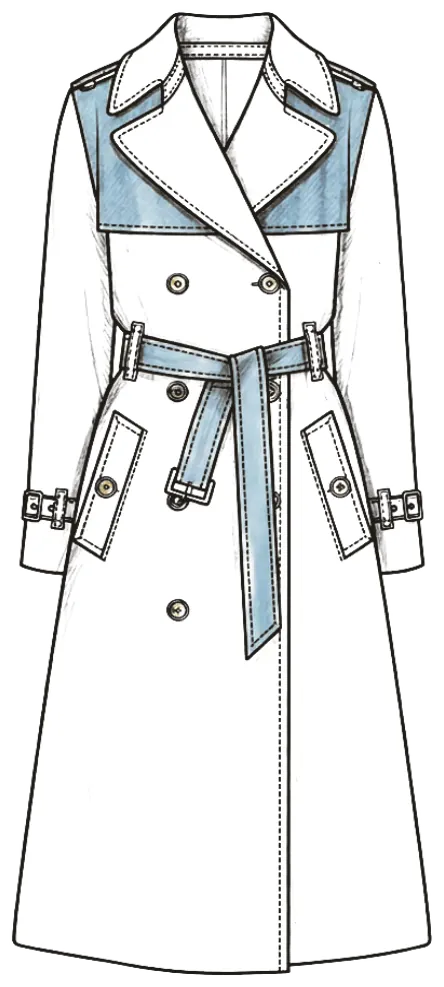
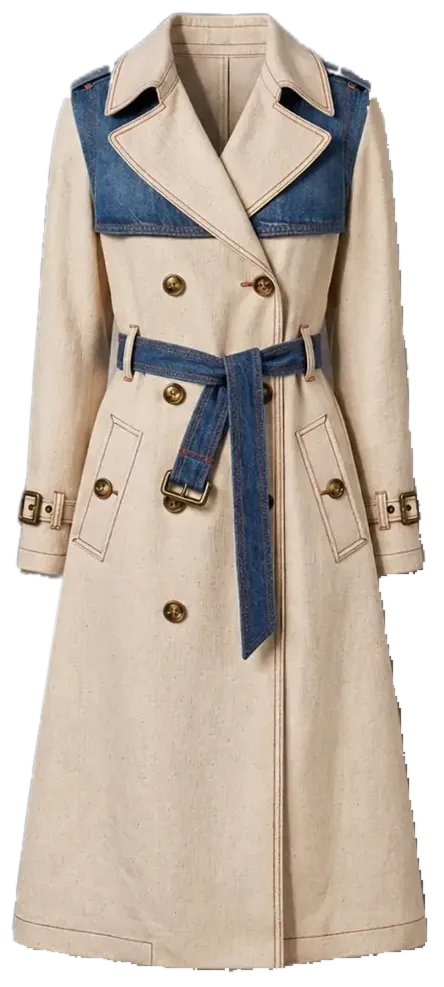
A coloured trench-coat sketch with a denim yoke and belt, and the product visual rendered from it. Drag to compare.
What it is for
See the design before the sample
A sketch or a technical drawing says what a product should be; a render shows how it will look. Sketch to Reality turns one into the other. Upload the drawing, choose one of 24 product categories or describe your own, and set the material in words, with one fabric image, or area by area, so each panel, such as the body, the collar or the cuffs, gets its own material. MYTH renders a realistic product visual at 1K, 2K or 4K.
Use it as a first look at a sample: judge proportions, materials and colour with the team or a buyer before a physical sample is made. The categories run from clothing, footwear and bags to bedding sets, towels, curtains, carpets and furniture, so it works for home textiles as well as fashion. Going the other way, Real to Sketch turns a product photo back into a technical flat, and Create Product starts from words or a photo instead of a drawing.
Who uses it, and for what
Fashion designers
Turn a flat sketch or a coloured illustration into a product visual, and check proportions, fabric and colour before anything is cut.
Home-textile teams
Render bedding sets, towels, curtains and pillowcases from a drawing, with a fabric image standing in for the material.
Carpets, furniture and interiors
Each has a category of its own, as do ceramics and interior, exterior and landscape scenes, all with the same material controls.
Presenting to buyers
Show a customer a realistic visual of a proposal while it is still a drawing, with the main colour named after its nearest Pantone.
The details
What goes in, what comes out
- Sketch
- Required: a sketch or a technical drawing, uploaded or drawn with the pencil in MYTH Edit
- Product category
- Required. 25 options: 24 categories from Top Wear, Dresses and Footwear to Bedding Sets, Carpets, Furniture and Interior, plus Something else… in your own words
- Main colour
- Optional. Auto takes it from the sketch; a colour you pick is named after its nearest Pantone
- Material
- Describe it in words, one Fabric image for the whole sketch, or By area: its own material for each region
- Design details
- Up to 2,000 characters for trims, stitching, hardware or fabric weight. Left blank, suitable materials and details are chosen for you
- Inspiration image
- Optional: a second image to take inspiration from
- Output
- 10 aspect ratios (3:4 for bottom wear and outerwear, 1:1 for the rest unless you change it) at 1K, 2K or 4K
- Cost
- Follows the resolution: 2K costs twice as much as 1K, 4K four times; a failed run is refunded
Questions
About Sketch to Reality
Something else? Ask the team.
What kind of sketch works?
A sketch or a technical drawing, uploaded as an image; the coat above started as a coloured sketch. You can also draw one with the pencil in MYTH Edit and send it straight back with Use as sketch.
How do I control the materials?
Three ways: describe them in words (patent leather, suede, denim, silk, knit…), add one fabric image for the whole piece, or choose By area and give each region of the sketch its own material. Select each region with the magic wand or Object Select.
Do I have to fill in every field?
No. Only the sketch and the product category are required. Leave the colour on Auto and it comes from the sketch; leave the design details blank and suitable materials and details are chosen for the category.
Which products does it cover?
Twenty-four categories: clothing from tops and dresses to beachwear and socks, footwear, bags, headwear, scarves, jewellery and eyewear; furniture, carpets, ceramics, bedding sets, towels, curtains and pillowcases for the home; interior, exterior and landscape scenes. For anything else, pick Something else… and describe the product yourself.
What does a render cost?
It follows the resolution: 2K costs twice as much as 1K and 4K four times as much. You see the credits before you press Render Sketch, and a failed run is refunded.
How is it different from Create Product?
Create Product starts from words or a photo. Sketch to Reality starts from your drawing and renders that design, with category, colour and material controls made for it.
Product AI · every plan
Try it on your own design.
Every plan includes every tool. Credits are in your account the moment payment is confirmed.